You’re being
watched.
There are cameras all along your drive.
You’re Flocked helps you see them coming.
See nearby cameras, get a heads-up as you approach, and find a route past fewer of them. Right on your iPhone.
A better picture of
the road around you.
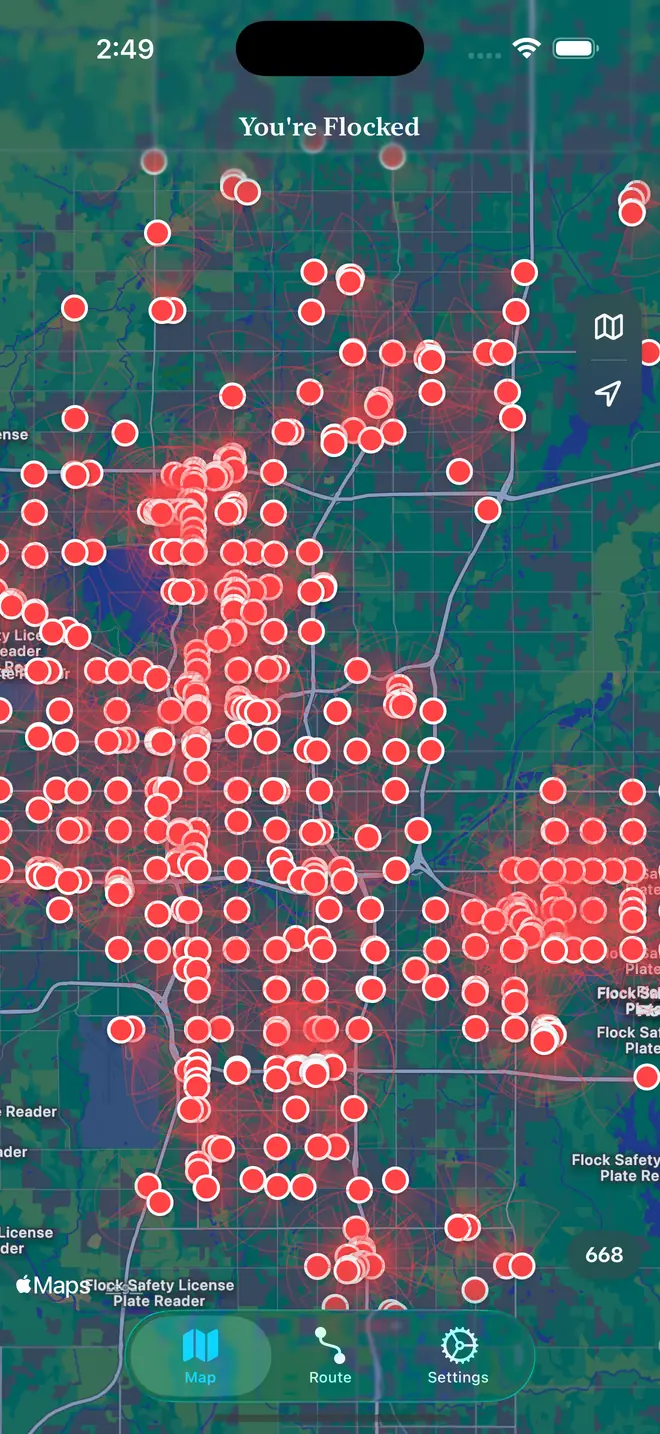
License plate readers. Speed cameras. The camera you’ve driven past a hundred times without noticing. You’re Flocked puts them on the map, using locations contributed by people who spotted them.
A heads-up.
Not a guessing game.
Open the map to see what’s nearby. The app shows automated license plate readers (ALPR), speed cameras, and other surveillance equipment, with viewing directions where the data is available.
You don’t have to keep staring at the screen, either. Proximity alerts let you know when you’re getting close, even with your phone in your pocket.
- Community-mapped camera locations
- Alerts at a distance you choose
- Filters for the cameras you care about
Same destination.
Fewer cameras.
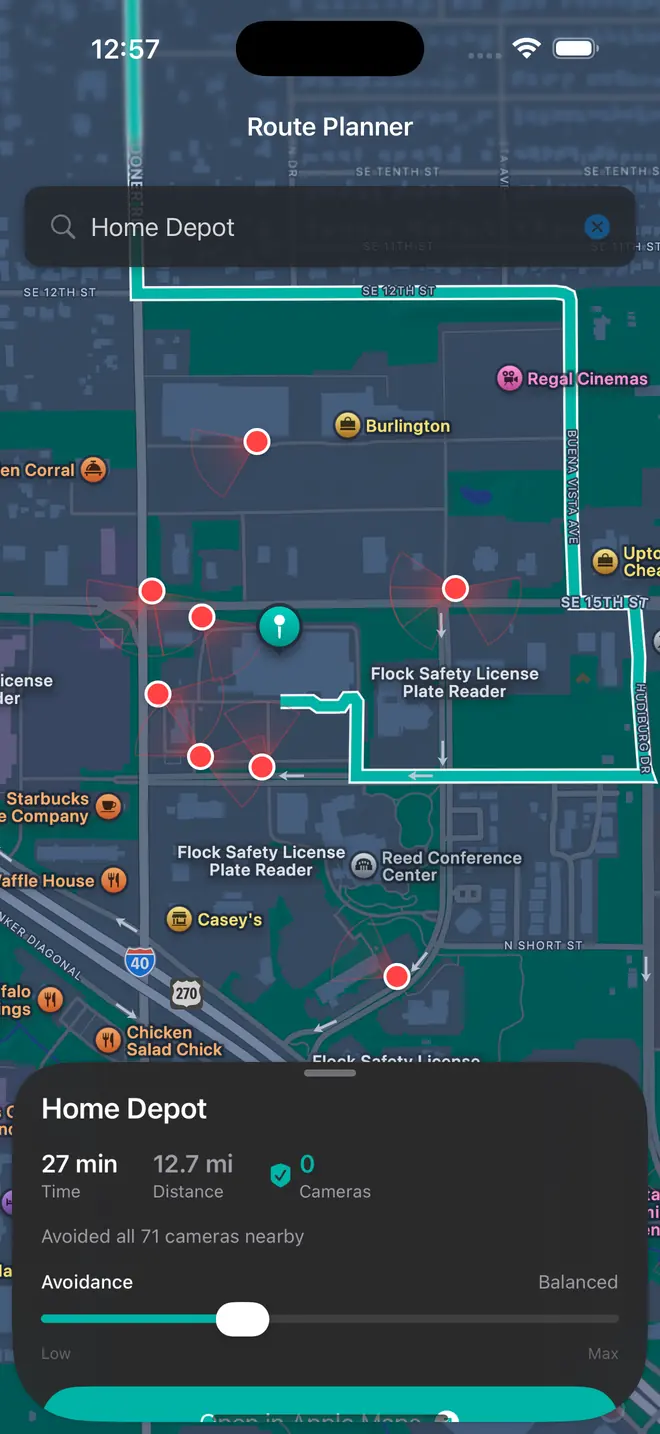
Pick where you’re going and how much you’d like to avoid cameras. You’re Flocked weighs the options and plans a route, entirely on your phone.
Download a region pack before you head out. The routing engine works from that saved road data, so planning a route doesn’t need a round trip to a server.
Browse routing regionsRoutes use known camera locations. They can reduce exposure, not guarantee a camera-free drive.
Your phone should
look out for you.
Not keep tabs on you.
Telling you there’s a camera up ahead doesn’t take an account, a record of your trips, or a pile of analytics. So the app doesn’t ask for any of them.
You’re Flocked calculates proximity alerts and routes on your device. There’s no location history, no telemetry, and no routing server receiving your start point and destination.
That doesn’t make the whole app offline. Camera lookups use DeFlock and OpenStreetMap, and map imagery comes from Apple. The privacy page spells out what those services receive.
Read what leaves your phoneOpen source.
In good company.
You’re Flocked is inspired by DeFlock and built on camera data people contribute to OpenStreetMap. It’s a small part of a much bigger effort to make surveillance visible.
Have a look under the hoodA few things
worth knowing.
Does it know about every camera?
No. Camera locations are contributed by people, so coverage depends on what’s been mapped in your area. Missing or outdated locations are possible. You’re Flocked is an awareness tool, not a guarantee that you won’t be recorded.
Can I use it without an internet connection?
Route calculation works offline once you’ve downloaded the right region pack. Alerts keep working from camera data already on your phone. Fresh camera lookups, place searches, and Apple map imagery still need a connection.
What phones does it work on?
The current app is an iPhone beta, installed through TestFlight, and needs iOS 17 or later. Android is planned, but isn’t available yet.
Do I need to run a server?
No. Out of the box, the app downloads its road data from tiles.flckd.app. Self-hosting is for people who’d rather serve that data from their own machine. Either way, routes are calculated on your phone. Read the self-hosting guide.
Is it FLCKD or You’re Flocked?
Both. The app is called You’re Flocked. FLCKD is the short name that fits under the icon on your home screen, so that’s what you’ll see on your phone.
Is this affiliated with Flock Safety?
No. You’re Flocked is an independent project. It is not affiliated with or endorsed by Flock Safety.
Go your own way.
A little more informed.
You’re Flocked for iPhone is in public beta. Install it through TestFlight.
It’s a beta, so expect rough edges and the occasional change between builds. You’ll need Apple’s free TestFlight app and iOS 17 or later.
Prefer to build it yourself? The source and instructions are on GitHub.